
Mayank Desai
UI/UX Designer & Framer Developer
Share On




Every minute a designer spends on mechanical, repetitive work is a minute not spent on the decisions that actually shape user experience. The Figma plugin ecosystem in 2026 has matured to address exactly this tension - offering targeted solutions for data import, responsive testing, illustration generation, pattern creation, and layer management that collapse multi-step processes into single actions. This article examines a second set of essential plugins that address the operational side of UI/UX design: the tasks that aren't glamorous but determine how quickly and cleanly a product design moves from concept to deliverable. Whether you're syncing live spreadsheet data, generating organic shapes, or testing breakpoints across screen sizes, the right plugin stack transforms your design process from manual labor into focused creative work.
Bringing Real Data Into the Design Process
One of the most impactful shifts in modern product design is the move from placeholder content to real data during the design phase itself. Google Sheets Sync addresses this directly by letting designers fetch and synchronize structured data from spreadsheets into Figma layers - eliminating the tedious copy-paste loop between documents and the canvas. The plugin supports proper sheet structure mapping, meaning columns of data can populate text layers, image fills, and component instances automatically. This matters because designs built with realistic data reveal layout issues - text overflow, inconsistent spacing, hierarchy breakdowns - that remain invisible when every field contains "Lorem ipsum" or identical sample content. Combined with plugins like Table Creator, which generates properly structured data tables from CSV input, designers can build complex information-dense interfaces with real variation from the start. The creative workflow shifts from decoration to validation: you're not just designing what something looks like, you're designing how it behaves with actual content.
Responsive Design Testing Without Developer Handoff
Responsive design has always lived in an uncomfortable gap between design tools and browser-based reality. The Breakpoints plugin narrows that gap significantly within Figma by providing a resizable instance of any frame, allowing designers and their teammates to explore responsive behavior directly on the canvas. What makes this particularly valuable for product design teams is that it works without the plugin window open - meaning developers, product managers, and stakeholders can interact with responsive frames without needing the plugin installed themselves. This democratizes responsive exploration across the team. Rather than designing static artboards at fixed widths and hoping the in-between states resolve cleanly during development, designers can now stress-test their layouts at arbitrary widths during the design process. The result is fewer surprises during implementation, tighter alignment between design intent and coded output, and a UI/UX design strategy that accounts for fluid behavior from the earliest iterations.
Automating Repetitive Visual Tasks
The operational cost of design isn't in the big creative decisions - it's in the hundreds of small, mechanical actions that accumulate across a project. Figma's plugin ecosystem excels at compressing these micro-tasks. Reverse Layer Order does exactly what its name implies: reversing the stacking order of selected layers within a parent frame, saving the designer from manually dragging layers one by one. Autoflow eliminates the tedium of drawing connector arrows between wireframe elements by automatically generating flow lines between selected objects - a small automation that dramatically speeds up user flow documentation and early-stage ideation. Remove BG handles background removal directly within Figma, eliminating the round-trip to external image editing software. Individually, each of these plugins saves only seconds. Collectively, across weeks and months of production design work, they reclaim hours of creative energy that can be redirected toward the design strategy and user experience decisions that actually differentiate a product. The principle is clear: automate the mechanical, protect the cognitive.
Generative Visual Elements: Illustrations, Patterns, and Shapes
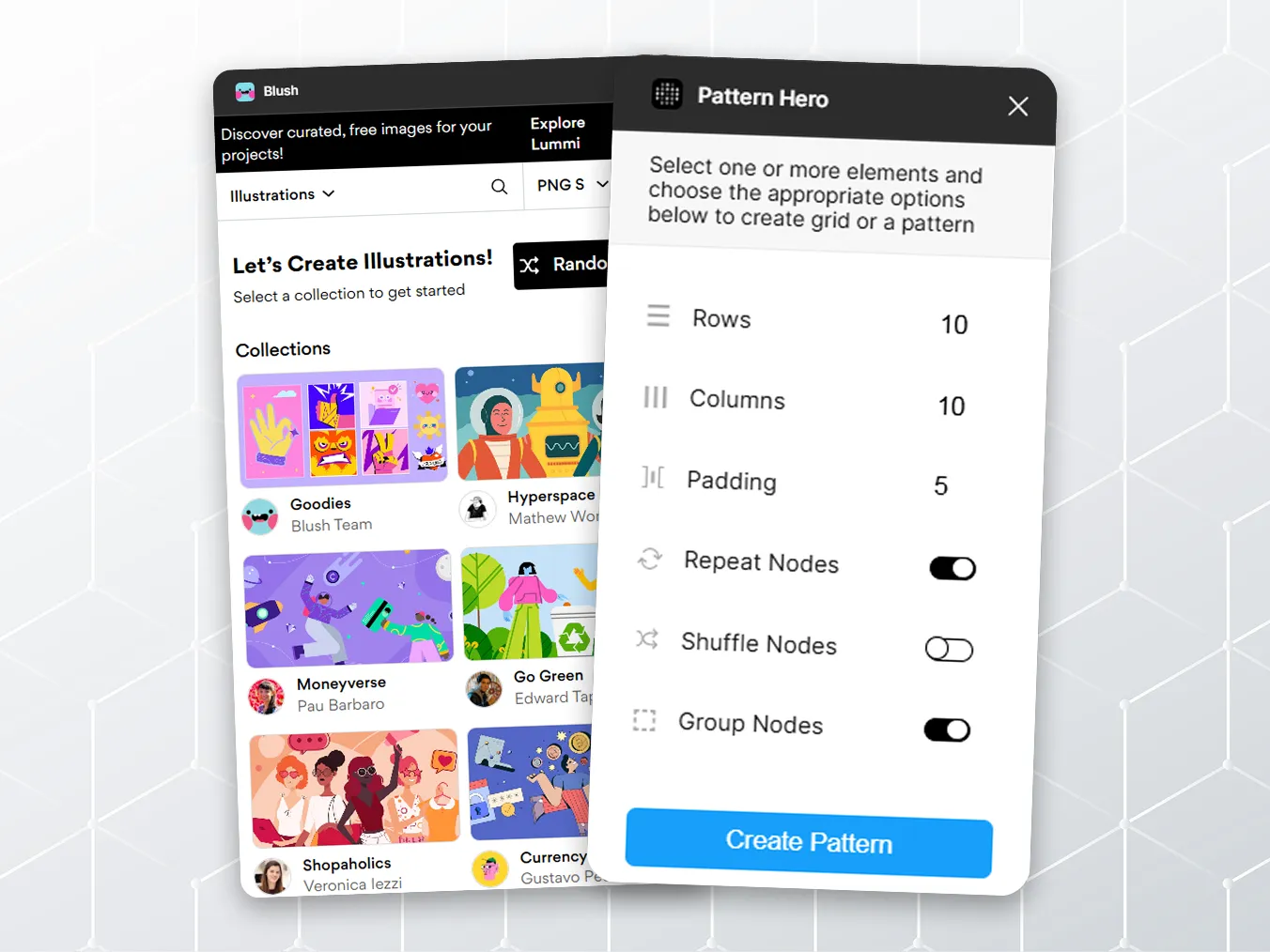
Not every design project warrants custom illustration from scratch, and not every team has a dedicated illustrator on staff. Plugins like Blush allow designers to create or mix-and-match customizable illustrations directly within Figma, with new artwork added weekly and the ability to generate random compositions that fit a project's tone. For more abstract visual needs, Blobs generates organic shapes with adjustable complexity and point count, while Get Waves produces SVG wave patterns useful for section dividers, chart backgrounds, and decorative layout elements. Pattern Hero takes custom elements and arranges them into repeatable grid-based patterns with options for shuffling and template creation. These tools collectively solve a common product design challenge: how to maintain visual richness and brand personality without bottlenecking the creative workflow on bespoke asset creation. The AI in design movement has accelerated this trend further, with generative tools producing increasingly sophisticated visual elements from simple parameters, but these focused plugins remain valuable precisely because they offer fine-grained control over aesthetic output without the unpredictability of broader generative AI systems.
Bridging Physical and Digital: Sketches, Typography, and Mobile Workflows
Design thinking doesn't always start on screen. Some of the most productive ideation happens on paper, whiteboards, or during informal brainstorming sessions - moments that traditionally required laborious manual translation into digital formats. Mobile Upload bridges this gap by letting designers photograph notebook sketches or whiteboard sessions and upload them directly to Figma from their phone, bypassing the email-to-desktop pipeline entirely. On the typographic side, Typescale generates harmonious, responsive typographic scales based on a chosen ratio and base value - applying mathematical precision to what might otherwise be intuition-driven font size decisions. This ensures consistent vertical rhythm across an entire design system without requiring designers to reference external type scale calculators. Together with Unsplash for immediate photographic assets and Autoflow for rapid wireframe documentation, these plugins complete a workflow that moves fluidly between physical sketching, digital prototyping, and polished UI/UX design. The design process becomes less about tool management and more about creative momentum - moving from idea to structured layout with minimal friction and maximum intentionality in every decision along the way.
Takeaways: The Compound Effect of Small Automations
The plugins in this collection share a common philosophy: they don't try to reimagine the design process from the ground up. Instead, they identify specific friction points - data entry, layer management, responsive testing, asset creation - and eliminate them with precision. For designers building their plugin stack, the lesson is that productivity gains in UI/UX design are rarely about finding one transformative tool. They're about layering multiple small efficiencies that compound over time. A designer who syncs Google Sheets data, generates typography scales automatically, tests breakpoints on canvas, and reverses layer order with a click isn't just marginally faster - they're operating in an entirely different productivity category than someone performing each of those tasks manually. As AI in design continues advancing, expect these discrete automations to merge into more intelligent, context-aware assistants. But for now, the curated plugin stack remains the most reliable design strategy for maintaining speed without sacrificing the craft and intentionality that define excellent product design and user experience.
Keywords naturally integrated: UI/UX Design, Product Design, Creative Workflow, Figma, Design Strategy, User Experience, Design Process, AI in Design