
Mayank Desai
UI/UX Designer & Framer Developer
Share On




The design landscape has shifted dramatically. In 2026, the Figma plugin ecosystem has matured into an essential layer of the UI/UX design process, with over 5,000 plugins available in the community directory. But volume alone doesn't equal value. The real challenge for product designers, creative professionals, and design teams isn't finding plugins - it's finding the right ones that genuinely improve their creative workflow without introducing friction. This article examines a curated set of Figma plugins spanning 3D design, accessibility, layout testing, content population, file management, and presentation - each solving a specific problem in the design strategy pipeline. Whether you're a solo designer refining user experience or a team lead standardizing a design process, these tools belong on your radar.
Understanding the Plugin Ecosystem: Why It Matters for Product Design
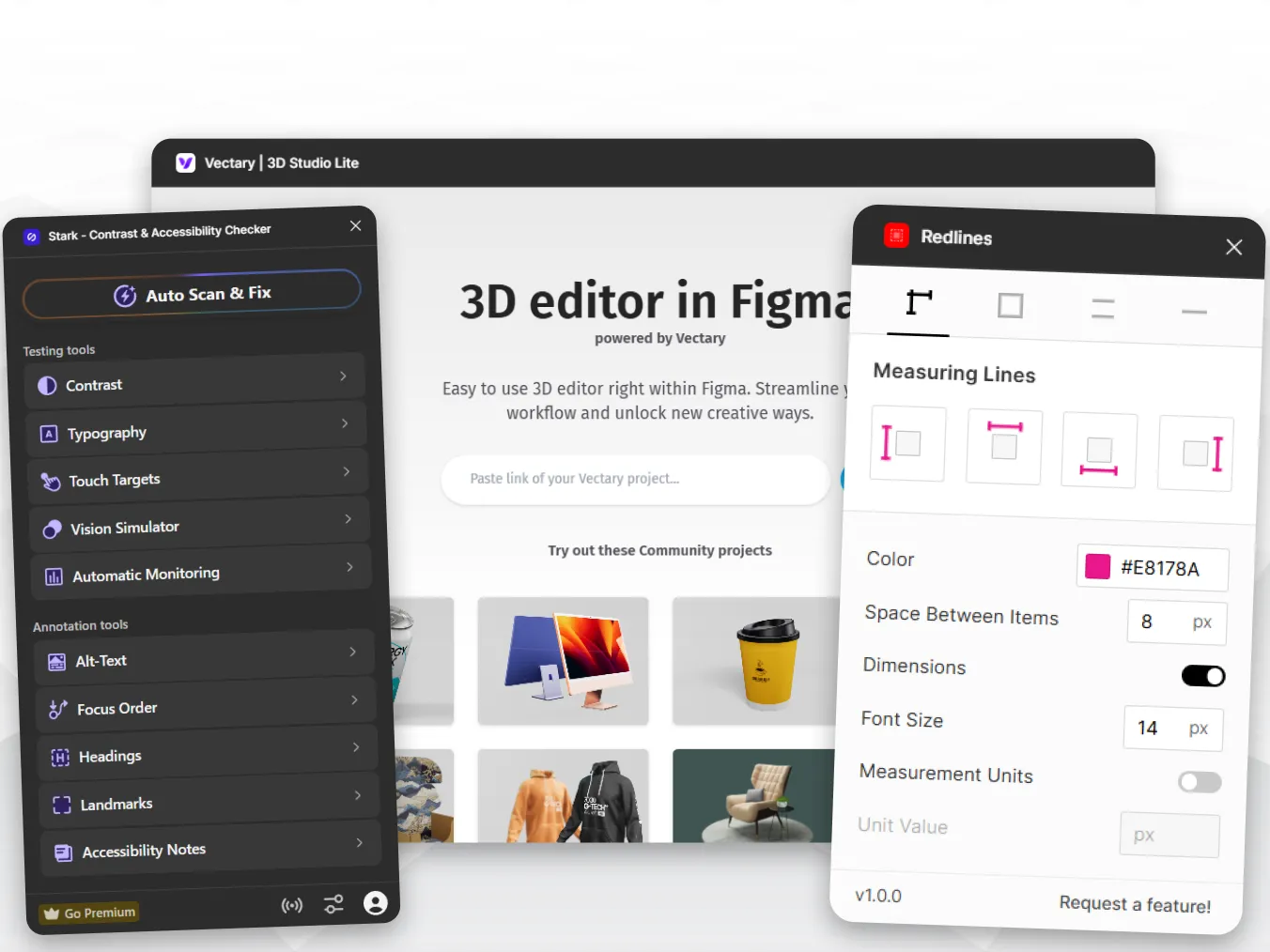
The modern product design workflow isn't defined by a single tool - it's defined by how well tools integrate and serve each stage of the design process. Figma plugins have evolved from novelty add-ons into genuine infrastructure. Plugins like Vectary 3D Studio Lite allow designers to add spatial depth to their mockups without leaving the canvas, turning flat screens into immersive product presentations. Meanwhile, tools like Wire Box reverse the process entirely, converting high-fidelity designs back into low-fidelity wireframes so teams can revisit information architecture after visual decisions have been made. This bidirectional flexibility is what separates a mature creative workflow from a linear one. The best designers don't just move forward through their design process - they move between fidelity levels fluidly, and the right plugin stack makes that movement effortless. Understanding which plugins serve which stage of your workflow is the first step toward building a design strategy that scales.
Accessibility and Precision: Designing for Every User
Inclusive design is no longer optional - it's embedded in the expectations of every product team shipping to production. In the UI/UX design space, accessibility plugins have transitioned from post-launch audit tools into real-time workflow companions. Stark remains one of the most comprehensive accessibility suites available in Figma, covering WCAG 2.1 and 2.2 compliance through contrast checking, vision simulation (including deuteranopia and protanopia), focus order validation, and touch target sizing. For teams that need quick spot-checks rather than full audits, the Contrast plugin offers a minimal, instant pass/fail evaluation against AA and AAA standards. The shift here is philosophical as much as practical: accessibility checks now happen during the design process, not after development. This means designers are making better user experience decisions at the moment of creation rather than retrofitting solutions later. Text Resizer complements this approach by letting designers stress-test their layouts against varying font sizes - an often-overlooked accessibility concern that directly impacts readability and usability across devices and user preferences.
Content, Assets, and Real-World Data in Your Designs
One of the most persistent time sinks in product design is populating layouts with realistic content. Placeholder text and gray boxes create a false sense of completeness that collapses the moment real data enters the frame. This is where plugins like Content Reel and UI Faces transform the design process. Content Reel lets designers pull in randomized names, addresses, dates, avatars, and custom text strings - stress-testing layouts with genuine variation rather than identical placeholder blocks. UI Faces provides AI-generated avatars filterable by age, gender, and emotion, giving user profiles and social interfaces an immediate sense of authenticity. For brand-related work, Brandfetch offers access to millions of logos directly within Figma, eliminating the scavenger hunt for correct brand assets. Icons8 extends this asset strategy further with over 120,000 icons across 32+ styles, all searchable and available in PNG or SVG. The pattern across these tools is consistent: they reduce context-switching, keep designers inside Figma, and ensure that creative workflow isn't interrupted by asset-hunting detours.
File Organization, Presentation, and the AI-Powered Future
As design files grow in complexity - especially across collaborative teams - organization becomes a design challenge in itself. Rename It solves this with batch renaming, sequential numbering, regex patterns, and case conversion, turning what would be a 30-minute manual cleanup into a 30-second operation. Redlines automates the annotation process for developer handoff, plotting precise measurements and dimensions on selected objects without the tedious manual work that once defined spec documentation. On the presentation side, Mockuuups Studio provides over 700 device mockup scenes for showcasing designs in context, while ARC lets designers bend and curve typography for more expressive layout explorations. Looking at the broader trajectory, AI in design is accelerating these capabilities. Plugins like UX Pilot now generate complete UI screens from text prompts with predictive heatmaps, and tools like Relume produce full-page wireframes from plain-language descriptions of sitemaps. The design strategy for 2026 and beyond is clear: AI handles the generative grunt work while human designers focus on judgment, refinement, and the nuanced decisions that define great user experience. The plugins that succeed are those that amplify human creativity rather than attempt to replace it.
Takeaways: Building Your Plugin Stack with Intention
The most effective approach to Figma plugins isn't maximalism - it's intentionality. Install one plugin at a time, use it for a full week, and evaluate whether it genuinely reduces friction in your specific workflow before adding the next. For solo product designers, a foundation of Stark (accessibility), Content Reel (data), Iconify (assets), and Rename It (file hygiene) covers the essential bases. For teams maintaining design systems, Tokens Studio for token management and Cleaner for file health become non-negotiable infrastructure. The key insight across every plugin category - from AI-powered generation to accessibility checking to content population - is that the best tools do one thing exceptionally well. They embed into your existing creative workflow rather than demanding you restructure your process around them. As AI in design continues to evolve, the designers who thrive will be those who treat plugins as a curated toolkit rather than a collection of experiments, selecting each tool based on how it serves their specific design process and the user experiences they're building.
Keywords naturally integrated: UI/UX Design, Product Design, Creative Workflow, Figma, Design Strategy, User Experience, Design Process, AI in Design